





An employee onboarding video is a short training or welcome video that helps a new hire understand the company, their team, the tools they will use, and what happens next. Good employee onboarding videos support the human onboarding process rather than replace managers, teammates, mentoring, or role-specific coaching.
Key takeaways
- Keep most onboarding topics to 2 to 5 minutes each instead of creating one long orientation film.
- Separate company-wide content from team and role-specific training so updates are easier.
- Use AI avatars for repeatable presenter content, but use real colleagues when human relationships are the point.
- Translate global onboarding materials, then have important terminology reviewed by a native speaker or local subject-matter expert.
- If you use a realistic AI version of a real executive, get consent and consider clear AI disclosure, especially for audiences covered by the EU AI Act.
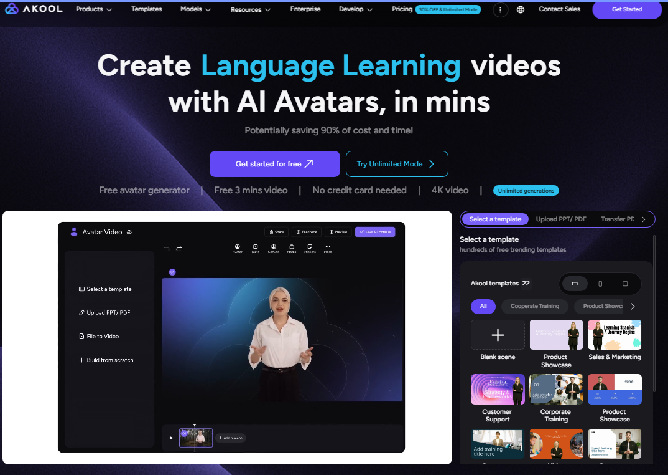
What Is an Employee Onboarding Video?
An employee onboarding video is a reusable video that introduces a new hire to information they need before and during their first weeks at a company. It can cover the welcome message, company culture, policies, benefits, systems, team introductions, role expectations, or next steps in a broader onboarding journey.
A good onboarding video answers one clear question at a time. “Who are we?” can be one video. “How do I submit an expense?” should probably be another.
This modular approach matters because onboarding is larger than orientation. Gallup argues that onboarding should not be treated as only an orientation class or the first 30 days. It is a longer process that helps employees understand their role, team, organization, and path to performance.
Preboarding is the period after a candidate accepts an offer but before their first day. A welcome message, practical first-day instructions, and a short culture introduction can begin here.
Time-to-productivity means how long it takes a new hire to reach an expected level of independent contribution. Video can make repeatable information easier to access, but managers, documentation, practice, and feedback still determine whether people can apply what they learned.
Employee Onboarding Video vs. Orientation Video vs. Training Video
| Format | Main purpose | Typical timing | Example |
|---|---|---|---|
| Employee onboarding video | Help a new hire integrate into the company and role | Preboarding through first 90 days | Welcome, team, tools, benefits |
| Orientation video | Cover organization-wide basics | Usually day 1 or first week | Office rules, policies, facilities |
| Training video | Teach a specific skill or procedure | Any time | CRM workflow, safety procedure |
| Compliance video | Explain mandatory policies or requirements | Onboarding and refresh cycles | Data security, conduct, safety |
The categories overlap. The practical difference is intent: onboarding gives the employee context and direction; training teaches them how to perform a specific task.
Why Do Onboarding Videos Matter for New Hire Retention and Productivity?
Onboarding videos matter because they make repeatable information available on demand and can give remote, hybrid, and global hires a more consistent baseline. They work best when they free managers from repeating basic information so managers can spend more time on relationships, coaching, expectations, and feedback.
The need is real. Gallup reports that only 12% of employees strongly agree their organization does a great job of onboarding. Gallup also stresses that a strong process should build belonging, role clarity, relationships, and connection to organizational purpose, not simply complete administrative tasks.
Remote onboarding makes information access more important. Microsoft Research found that 40% of surveyed new hires did not have at least one daily one-to-one communication from someone on their team during remote onboarding. Its guidance emphasizes up-to-date documentation, manager contact, team relationships, and onboarding buddies alongside formal resources.
The human element is especially important. Microsoft reports that 56% of new hires who met an onboarding buddy at least once in their first 90 days said the buddy helped them become productive more quickly. That rose to 73% for two to three meetings, 86% for four to eight, and 97% for more than eight meetings.
Microsoft has also reported that when managers played an active role in remote onboarding, new employees were 3.5 times more likely to report satisfaction with onboarding and 1.2 times more likely to feel they were contributing to team success.
Priya Priyadarshini, Microsoft's former general manager for employee career and development, summarized one useful principle simply:
“Every new employee should have an onboarding buddy.”
That is why onboarding videos should reduce repetitive communication, not replace human contact.
What Should Be Included in an Employee Onboarding Video?
An employee onboarding video should include only the information needed for that stage of the employee journey. At minimum, a complete video library should cover the welcome, company mission, people, systems, key policies, benefits, first-week expectations, support contacts, and a clear next action.
| Content | What the video should answer | Best format |
|---|---|---|
| Welcome message | Why are we glad you are here? | CEO, founder, or manager welcome |
| Mission and values | What does the company stand for? | Culture video |
| Team introductions | Who will I work with? | Real employee clips |
| Tools and systems | What software do I need? | Screen walkthrough |
| Policies | What rules must I understand? | Short policy modules |
| Benefits | What am I eligible for and where do I learn more? | Benefits explainer |
| First-week agenda | What happens next? | Timeline or presenter |
| Help contacts | Who do I ask when I am stuck? | Manager, buddy, HR contacts |
| Clear next step | What should I do after watching? | CTA at the end |
Avoid turning every detail in an employee handbook into a narrated video. Use video where voice, context, demonstration, or human presence improves understanding. Link out to the authoritative policy document for details that may change frequently.
What Are 8 Types of Employee Onboarding Videos?
The most useful onboarding video ideas divide the employee journey into specific jobs: welcoming the hire, explaining culture, introducing people, teaching policies and systems, developing role skills, explaining benefits, and supporting milestones from preboarding through the first 90 days.
1. Welcome Video for New Employees
A welcome video for new employees is a short message from the CEO, founder, manager, or team.
When to use it: before day one or at the start of the onboarding portal.
Ideal length: 1 to 2 minutes.
AKOOL workflow: use AKOOL Talking Avatar when you need a scripted presenter, or record the real leader when personal presence itself matters.
If you create an AI version of an executive, obtain explicit permission for their face and voice.
2. Company Culture and Values Video
This explains how the organization behaves, not just the words printed on a values page.
When to use it: preboarding and first week.
Ideal length: 2 to 4 minutes.
AKOOL workflow: use Avatar Video for structured narration, combined with real workplace footage, employee clips, and company visuals.
Culture is more convincing when real employees appear somewhere in the experience.
3. Manager and Team Introduction Videos
These videos help people put names, roles, and responsibilities together before the first round of meetings.
When to use it: first week.
Ideal length: 30 to 90 seconds per team or leader.
AKOOL workflow: use short real recordings where possible. For standardized intros, AKOOL HR AI Avatar can support reusable HR-led content.
Do not use synthetic coworkers as substitutes for people the employee will actually work with.
4. HR Policy and Compliance Training Videos
Policy videos explain conduct, security, privacy, workplace safety, leave procedures, or required compliance topics.
When to use it: first week and scheduled refreshers.
Ideal length: 2 to 5 minutes per topic.
AKOOL workflow: use AKOOL AI Avatar for Training for consistent presenter-led modules.
Always have the policy owner review the script. The video should explain the rule, while the official policy remains the source of record.
5. Software and Systems Walkthroughs
A systems walkthrough demonstrates tools such as an HRIS, CRM, expense platform, ticketing system, or internal knowledge base.
When to use it: immediately before the employee first needs the tool.
Ideal length: 2 to 6 minutes per workflow.
AKOOL workflow: if you already maintain onboarding slides, use turn your onboarding deck into a video, then combine those slides with screenshots or screen recordings.
6. Role-Specific Training Videos
These explain what success looks like in the employee's actual job.
When to use it: first 30 to 90 days.
Ideal length: 3 to 8 minutes per task or scenario.
AKOOL workflow: use Avatar Video or training avatars for repeatable explanations, then follow with a real assignment, manager feedback, or shadowing session.
Video can explain the process. Practice proves the employee can do it.
7. Benefits and Payroll Explainers
Benefits videos reduce repeated questions about enrollment windows, payroll timing, retirement plans, wellness programs, and where to get help.
When to use it: preboarding or first week.
Ideal length: 2 to 4 minutes.
AKOOL workflow: presenter-led Avatar Video works well because you can update the script when dates or plan details change.
Keep precise eligibility rules in the official benefits portal.
8. Preboarding and 30-60-90 Day Check-In Videos
These videos prepare employees for what happens next instead of front-loading everything into day one.
When to use it: after offer acceptance, day 30, day 60, and day 90.
Ideal length: 1 to 3 minutes.
AKOOL workflow: a short avatar or manager video can introduce each milestone. For employee questions, an AKOOL Streaming Avatar can serve as an interactive onboarding buddy for routine Q&A, while the human manager remains responsible for coaching and performance conversations.
What Are Good Employee Onboarding Video Examples?
The best onboarding video examples are not all formal onboarding films. Company culture videos, career content, leadership messages, and localized educational content can each demonstrate a piece of the experience HR teams need to build. The important question is what the example teaches you, not whether the company labels it “onboarding.”
Canva: Show the people behind the company
Canva's official Canva Culture video gives viewers a behind-the-scenes look at its team and workplace. It works as inspiration for culture onboarding because employees speak through the environment and energy of the organization rather than a list of values. Watch Canva Culture
What to borrow: real employees, workplace footage, and visual evidence of culture.
HubSpot: Connect culture to how work gets done
HubSpot's official culture video emphasizes transparency, employee autonomy, and the way its culture shapes work. Watch HubSpot Culture
What to borrow: explain behaviors and working norms, not just mission statements.
Google: Let employees describe the culture
Life at Google's official culture video features employees discussing their experiences. Watch A Look Inside Google's Culture
What to borrow: peer voices make abstract values more concrete.
Salesforce: Explain the working model
Salesforce's Success From Anywhere careers video explains how its flexible-work culture is intended to operate.
What to borrow: onboarding content can explain how the company works, not only who the company is.
Netflix: Treat culture content as source material
Netflix's official Culture Memo is not an onboarding video. It is still a useful example of structured culture content that could be adapted into shorter onboarding modules around decision-making, performance, and working principles. Read the Netflix Culture Memo
What to borrow: start with a clear written culture source before turning it into video.
Logitech and AKOOL: A localization example that applies to onboarding
AKOOL's Logitech case study is about multilingual webinars for webcam products, not employee onboarding. Logitech used AKOOL Video Translation to adapt webinar content into 38 languages, with native-speaker review of technical terminology. That workflow is directly relevant to global onboarding because the same translation, lip-sync, terminology review, and brand-consistency requirements apply. Read the Logitech case study
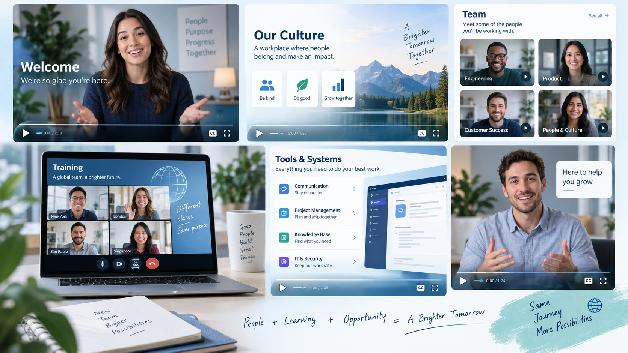
How Long Should an Onboarding Video Be?
Most onboarding videos work best at about 2 to 5 minutes per topic, split into modules rather than one long presentation. A welcome can be shorter, while a software walkthrough may need more time. The right length is the shortest duration that explains one task clearly without removing necessary context.
| Video type | Practical target length |
|---|---|
| CEO or founder welcome | 1 to 2 min |
| Culture and values | 2 to 4 min |
| Team introduction | 30 to 90 sec |
| Policy module | 2 to 5 min |
| Benefits explainer | 2 to 4 min |
| Software walkthrough | 2 to 6 min |
| Role-specific training | 3 to 8 min |
| 30-60-90 check-in | 1 to 3 min |
Do not force a 20-minute compliance topic into five minutes if the information genuinely requires more. Break it into chapters instead.
How to Make Employee Onboarding Videos with AI: Step by Step
AI for employee onboarding works best when you use it to standardize repeatable content while keeping real managers, teammates, mentors, and subject-matter experts involved. A practical workflow maps the employee journey first, then creates modular scripts, presenters, voices, slide-based content, translations, and LMS delivery around that journey.
Step 1: Map Your Onboarding Journey
Start before you open a video tool.
Map the path from preboarding to day 90:
- Offer accepted
- Before day one
- Day one
- First week
- First 30 days
- Day 60
- Day 90
For each stage, list what the employee needs to know, do, feel, and ask.
Use video for repeatable explanations. Keep live conversations for introductions, feedback, coaching, and ambiguity.
Step 2: Write Short, Conversational Scripts
Write one script around one outcome.
Instead of:
“Welcome to our comprehensive onboarding training covering our history, values, technology, security, benefits, and organizational chart...”
Use:
“Welcome to the team. In the next two minutes, I'll show you what your first week looks like, who to ask for help, and the three things to complete before Friday.”
Read every script aloud. Short sentences sound more human and translate more cleanly.
Step 3: Choose an AI Avatar or Create a Custom One
An AI avatar is a synthetic digital presenter that can deliver a script without recording a new live performance for every update.
For standard HR modules, choose an approved avatar through AKOOL Avatar Video.
If you want a digital version of a real executive, obtain explicit permission before creating or using their likeness.
For highly personal moments, use the real person instead. The welcome from a direct manager often matters precisely because it is human.

Step 4: Pick a Voice, or Clone a Leader's Voice With Consent
Choose a synthetic voice that matches the organization and audience, or use an approved cloned voice.
AKOOL's Voice Lab supports voice generation and voice-cloning workflows. AKOOL currently describes Voice Lab as supporting multilingual voice generation and voice transformation.
Do not clone a CEO, manager, employee, or public figure because “the audio is online.” Get clear authorization covering the intended business use.
Step 5: Turn Existing Onboarding Slides into Video
Many HR teams already have a deck containing company history, benefits, IT instructions, and policies.
Do not rebuild it from scratch.
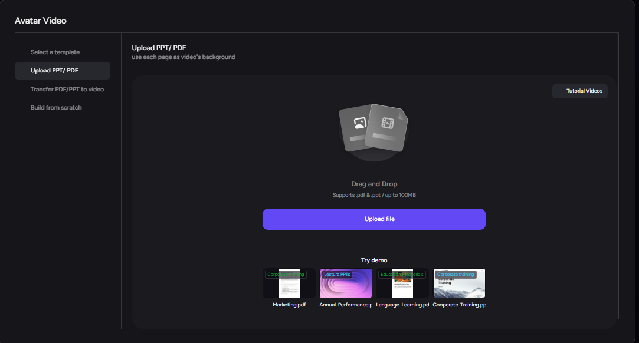
Use turn your onboarding deck into a video to start from an existing PPT or PDF, then divide the material into smaller modules.
AKOOL's current tutorial library explicitly includes “Avatar Video - Upload PPT/PDF” and “File to Video” workflows.
Step 6: Translate for Global Teams
Once the source version is approved, localize it.
AKOOL's Video Translation currently supports 155+ languages, along with voice synthesis and lip-sync workflows.
For high-stakes or technical onboarding, have a native speaker or local subject-matter expert review terminology before publishing.
The Logitech case is useful here: its multilingual webinar workflow included native-speaker checks for technical language.
Step 7: Publish in Your LMS or HRIS and Update in Minutes
Export the approved modules and publish them in your learning or HR system.
Examples include LMS platforms such as Workday Learning or Docebo, or the learning layer connected to your HRIS.
Track which version is current. When a policy changes, edit the source script, regenerate only the affected module, and replace that asset rather than reshooting an entire orientation program.
How Does AI Employee Onboarding Compare With Traditional Video Production?
AI employee onboarding is most useful when content changes often, needs many languages, or must be produced in repeatable modules. Traditional production remains stronger when real leadership presence, real workplace footage, physical demonstrations, or documentary authenticity are central to the message.
| Factor | Traditional onboarding video | AI-assisted onboarding video |
|---|---|---|
| Cost model | Crew, talent, equipment, location, editing, usually project-quoted | Subscription and/or credit-based software |
| Production time | Requires scheduling, filming, editing, approvals | Script-led generation, timing varies by tool and length |
| Update time | Often requires re-edit or reshoot | Change script and regenerate affected module |
| Languages | Translation, dubbing, subtitles or reshoots | Automated translation and synthetic voice options |
| Skills needed | Camera, lighting, production, editing | Script, brand review, AI workflow, QA |
| Consistency | Depends on shoot and presenter availability | Presenter and delivery can be standardized |
| Best for | Human stories, real environments, demonstrations | Repeatable explanations, updates, localization |
There is no honest universal “traditional video costs X and AI costs Y” number. Traditional quotes vary by location, crew, talent, length, and production level.
For a current software benchmark, AKOOL's pricing page lists paid tiers beginning at $12 per seat per month when billed yearly, while the Business plan with a business licence is currently $174.30 per seat per month billed yearly.
That subscription is not the same thing as a finished-video cost. Your real cost also includes scriptwriting, review, localization QA, and administration.
How Do You Create Onboarding Videos for a Multilingual Workforce?
Create one approved source version first, then translate it while preserving meaning, terminology, speaker identity, and cultural context. AI can automate much of the mechanical translation and lip-sync process, but a human reviewer should check important HR, legal, technical, and benefits language before the video reaches employees.
Start with plain source language. Idioms and jokes often translate badly.
Build a terminology sheet for:
- Product names
- Team names
- Legal terminology
- Benefits language
- Internal acronyms
- Job titles
- Names and pronunciation
Then use AKOOL Video Translation to create localized versions. AKOOL currently states support for 155+ languages.
Do not localize words only. Localize examples too.
A U.S. benefits example about a 401(k) may be irrelevant to an employee in another country. A global onboarding module may therefore need different examples, links, or policy references even when the main culture message is shared.
Do You Have to Disclose AI Avatars in Onboarding Videos?
Sometimes. In the EU, Article 50 transparency rules have applied since 2 August 2026. The exact obligation depends on how the AI system and content are used, including whether a realistic generated or manipulated video qualifies as a deepfake. A clear disclosure is a sensible default when employees could reasonably believe an AI presenter is real.
This section is practical guidance, not legal advice.
What the EU AI Act Requires from August 2026
EU AI Act Article 50 applies from 2 August 2026. It includes transparency obligations for certain AI interactions and AI-generated content.
For deepfakes, Article 50(4) requires deployers of AI systems that generate or manipulate image, audio, or video constituting a deepfake to disclose that the content was artificially generated or manipulated. The Act defines this around content resembling existing people, objects, places, entities, or events in a way that may falsely appear authentic or truthful.
The European Commission says disclosure must be made by first exposure at the latest, in a clear and distinguishable way that people can perceive without special technical tools.
For onboarding, the practical approach is simple:
This video uses an AI-generated presenter.
Place that notice at the start when the presenter is realistic enough that an employee could reasonably assume a real person recorded the message.
Using an AI Version of Your CEO: Consent and Trust
A realistic AI CEO creates a second issue beyond disclosure: permission.
Get written consent before cloning a person's face or voice. Define:
- Which onboarding videos may use the digital likeness
- Which languages may be generated
- Who can approve scripts
- Whether the avatar can be reused later
- How consent can be withdrawn
- What happens if the executive leaves
Disclosure also protects internal trust. Employees should not have to wonder later whether the CEO really recorded something they watched.
A generic avatar is different from impersonating a real executive, but HR should still be transparent where the presentation could mislead viewers about human involvement.
Free Onboarding Video Script Template
A two-minute welcome video should make the employee feel expected, explain what happens next, and give them a person or place to go for help. It does not need to summarize the entire organization.
Welcome Video for New Employees: 2-Minute Script
0:00-0:10 | Hook
Hi [First Name], and welcome to [Company]. We're glad you're here. Your first week is designed to help you understand how we work, meet the people around you, and get comfortable with the tools you'll use every day.
0:10-0:35 | Who we are
[Company] exists to [mission in one sentence]. Our work is guided by [two or three values]. You will hear more about those values during onboarding, but the most important thing to know today is how they show up in everyday decisions.
0:35-1:10 | What your first week looks like
On day one, you'll meet your manager and team and complete your account setup. During the week, you'll work through short modules on [systems], [policies], and [product or service]. You will also have time with your onboarding buddy to ask questions that do not belong in a formal training session.
1:10-1:35 | Who to ask
If you have a role question, start with your manager or buddy. For benefits and HR questions, go to [HR channel or portal]. For technical support, use [IT channel]. You are not expected to remember everything at once.
1:35-2:00 | Next step
Your next step is [specific action]. Complete that before [date or milestone], then open your first-week checklist. Welcome again. We're looking forward to working with you.
Use a real manager when personal connection matters. Use AKOOL Talking Avatar when you need a repeatable scripted version.
How Do You Measure If Your Onboarding Videos Work?
Measure behavior and employee outcomes, not just views. A good dashboard connects video consumption to understanding, role readiness, questions, and retention while avoiding the assumption that video alone caused the result.
| Metric | What it tells you | How to use it |
|---|---|---|
| Completion rate | Whether employees finish the module | Flag videos with early drop-off |
| Quiz score | Whether key information was understood | Review weak questions/topics |
| Time-to-productivity | How quickly role milestones are reached | Compare cohorts cautiously |
| 90-day retention | Whether hires remain through early tenure | Pair with broader onboarding data |
| New-hire survey score | How useful employees found onboarding | Ask about clarity and relevance |
| HR ticket volume | Which topics still create repeated questions | Create or update modules |
| Manager feedback | Whether employees arrive prepared | Collect at day 30/60/90 |
Do not claim a video's impact on retention unless your measurement design supports that conclusion. Onboarding is a system, not a single asset.
What Is the Best Onboarding Video Software in 2026?
The best onboarding video software depends on whether you need AI presenters, multilingual localization, process walkthroughs, or quick screen recordings. AKOOL and avatar-first tools fit repeatable presenter content; Guidde and Loom are particularly useful when the main job is showing employees how to complete a process on screen.
Pricing verified October 2026.
| Tool | Best use | AI avatar | Translation | Current starting price |
|---|---|---|---|---|
| AKOOL | Avatar onboarding, translation, PPT/PDF conversion, interactive Q&A | Yes | 155+ languages in Video Translation | Starter $12/seat/mo yearly; Business licence tier $174.30/seat/mo yearly |
| Synthesia | Structured enterprise learning and avatar modules | Yes | Multilingual video/dubbing | Basic $0; Starter $29/mo or $18/mo yearly |
| HeyGen | Presenter and multilingual avatar content | Yes | Strong localization stack | Free; Creator $29/mo |
| Guidde | Software walkthroughs and process documentation | Enterprise custom avatar | Enterprise translation | Free; Pro $29/mo or $19/mo yearly |
| Loom | Fast real-person screen recording | No dedicated avatar workflow | Transcription in 50+ languages | Free; Business $18/user/mo |
AKOOL pricing is current as of October 2026. Synthesia's October 2026 pricing lists Basic at $0, Starter at $29 monthly or $18 monthly on annual billing, and Pro at $89 monthly or $64 monthly on annual billing. HeyGen lists Creator at $29 per month. Guidde lists Pro at $29 monthly or $19 monthly with annual billing. Loom lists Business at $18 per user per month and Business + AI at $24.
No single tool is right for every module. A practical stack may use Loom for a manager's quick screen walkthrough, AKOOL for multilingual presenter content, and an LMS for delivery and tracking.
What Common Onboarding Video Mistakes Should You Avoid?
The most common onboarding-video mistakes are making videos too long, turning policies into lectures, using synthetic presenters where a human relationship matters, allowing content to go out of date, skipping captions, and failing to disclose realistic AI presenters when disclosure is appropriate or required.
Avoid these six patterns:
- One giant orientation video. Split content into topics.
- Policy without context. Explain why the rule matters and link the source policy.
- Avatar instead of manager. Do not automate the relationship itself.
- No owner or update date. Every video should have an accountable content owner.
- No captions or accessible alternative. Accessibility is part of onboarding quality.
- No AI disclosure plan. Decide when employees should be told a presenter or voice is synthetic.
Conclusion: Build Employee Onboarding Videos Around the Employee Journey
The strongest employee onboarding videos do not try to replace onboarding. They make repeatable information easier to understand, update, translate, and revisit so HR and managers can spend more time on the conversations that actually require people.
Start with one useful module: a welcome video for new employees, a benefits explainer, a system walkthrough, or a culture introduction. Keep the script short, assign a content owner, and connect the video to a clear next step.
To create a presenter-led module, use AKOOL Talking Avatar. If your current onboarding already lives in slides or PDFs, you can also turn your onboarding deck into a video.
Frequently Asked Questions
What is an employee onboarding video?
An employee onboarding video is a reusable video that helps a new hire understand the company, team, role, tools, policies, benefits, or next steps. It can be used before day one or throughout the first 30, 60, and 90 days. Videos work best as one part of a broader human onboarding process.
How long should an onboarding video be?
Most onboarding videos should be about 2 to 5 minutes per topic. A CEO welcome may need only one minute, while a software walkthrough may need five or more. If a topic becomes long, split it into modules so employees can watch the part they need and return to it later.
What should be included in an employee onboarding video?
Include the information needed for that point in the onboarding journey: a welcome, mission and values, team contacts, tools, essential policies, benefits, first-week expectations, support resources, and a clear next action. Keep detailed policy text in the official source document rather than trying to place every rule in the video.
Can AI create employee onboarding videos?
Yes. AI can create presenter-led onboarding videos from scripts, convert slides into video, synthesize or clone authorized voices, and translate approved content into other languages. Human HR, L&D, legal, and subject-matter owners should still review the script and final output, especially for policies, benefits, safety, and compliance content.
Do I have to tell employees an onboarding video uses an AI avatar?
It depends on the content, audience, and applicable law. In the EU, Article 50 transparency obligations have applied since 2 August 2026, including disclosure requirements for qualifying deepfakes. A practical default is to disclose realistic AI presenters clearly at first exposure when employees could reasonably believe a real person recorded the video.
Can we use an AI version of our CEO in a welcome video?
Yes, if you have appropriate consent and the use complies with applicable law and company policy. Get written authorization for the CEO's face and voice, script approval, languages, duration of use, and reuse. Clearly label a realistic synthetic CEO where viewers could otherwise believe the executive personally recorded that specific message.
How do I make onboarding videos in multiple languages?
Approve the source script first, then translate it, generate or dub the target voice, apply lip sync where useful, and have important HR or technical terminology reviewed by a native speaker or local expert. AKOOL Video Translation currently supports 155+ languages, but localization should adapt examples and policies as well as words.
How often should onboarding videos be updated?
Review each module whenever its source information changes and schedule a regular content audit at least once or twice a year. Policy, security, benefits, systems, and leadership videos may require more frequent updates. Put an owner and last-reviewed date on every module so outdated content does not stay in the onboarding library unnoticed.
Can onboarding videos replace in-person onboarding?
No. Onboarding videos can make information consistent and available on demand, but they cannot replace the relationships that help a new hire understand context, ask sensitive questions, receive feedback, and build trust. Keep a human manager, onboarding buddy, and team interactions as core parts of the employee experience.
How much does it cost to make an employee onboarding video?
There is no universal cost. Traditional video depends on crew, presenters, locations, editing, and reshoots. AI tools usually use subscriptions or credits. For example, AKOOL currently lists a Business plan with a business licence at $174.30 per seat per month billed yearly, but your total onboarding cost also includes scripting and review.