상위 5가지 인공 지능 비디오 제작 도구: 사진을 움직임으로 바꿔보세요

Updated: 
May 19, 2026
2026년 최고의 AI 영상 및 3D 제작 도구 5가지를 살펴보세요. 사진을 역동적인 움직임으로 바꿔주는 이 도구들은 Runway의 예술적인 애니메이션부터 Akool의 영화 같은 물리 기반 클립, 그리고 Tripo AI의 이미지-3D 모델 생성까지 아우릅니다.
목차

In 2026, AI image-to-video technology is revolutionizing content creation, allowing anyone to transform static images into dynamic video stories. This evolution from still pictures to moving narratives is bridging the gap between photos and films, empowering creators with dynamic video generation at the click of a button. Below, we explore the top 5 platforms leading this shift – each turning photos into motion, depth, or 3D creative assets in unique ways.


1. Runway ML — Generative Video Playground

Runway ML leverages cutting-edge foundation models (including research from Meta AI) to achieve creative image-to-video generation. It stands out as a Generative Video Playground in the artificial intelligence create video arena, enabling artists to seamlessly blend images into moving, stylistically rich videos. Especially adept at imaginative visuals, Runway specializes in turning static inputs into artful, dynamic video effects that spark creativity.

Key Features:

  • Image-to-Video Generation Models – Runway offers multiple generative models (Gen-1 through Gen-4) that turn text or images into short cinematic video clips. For example, using a single reference image, Gen-4 can generate consistent characters and objects across scenes, maintaining coherent environments as it animates the picture. The system excels at producing highly dynamic videos with realistic motion, while keeping subjects and styles consistent.
  • Artistic Style Application – Renowned for its creative flair, Runway lets you apply various artistic styles and effects during generation. This means an input image can be transformed into a surreal animation or stylized movie scene using just a prompt. It’s essentially a sandbox for experimenting with visual styles, from painting-like filters to dynamic video generation that simulates real-world physics in imaginative ways.
  • Motion & Camera Controls – Unlike many AI video tools, Runway provides fine control features to direct your AI-generated video. With Multi-Motion Brush and Camera Move tools, creators can specify which areas of an image should move and even define virtual camera pans or zooms. This offers a layer of directorship over the AI – you can, for instance, keep a subject still while the background swirls, or simulate a camera dolly shot in an AI-generated scene.
  • Collaborative Editing & Integrations – Runway is not just for generation but also for editing and teamwork. It includes video editing functions like inpainting, background removal, and color grading via simple prompts. A collaborative cloud workspace allows teams to co-edit and annotate frames in real time. Plus, it supports plugins and custom models, so developers and artists can integrate their own AI models or connect Runway with other creative software.

Use Cases:
Runway ML is popular for experimental and artistic projects. Filmmakers and video editors use it to prototype visuals – for example, generating an AI video backdrop of a “neon city sunset” for a music video or ad. Social media creators rely on Runway for eye-catching B-roll and animated transitions that make TikToks and Reels pop. Its ability to quickly apply wild styles makes it ideal for creative campaigns – marketers can test surreal, attention-grabbing visuals for an advertisement. Additionally, design teams explore brand aesthetics by turning mood-board images into animated concept clips, since Runway can rapidly iterate various looks and color grades. In short, Runway is the playground for turning imaginative ideas and reference images into moving art.

Limitations:
Generative videos from Runway are typically brief. Outputs generally max out around 4–8 seconds long, so creating anything longer requires stitching together multiple clips. The motion it produces is sometimes simplistic or unpredictable – complex sequences may lack the logical consistency of a hand-edited video. There are also usage limits: heavy rendering jobs can incur queue times or consume credits quickly. In practice, Runway is fantastic for concepts and short-form visuals, but less suited for extended, highly polished videos without additional post-production.
2. Akool — Cinema-Grade Image Animation Engine

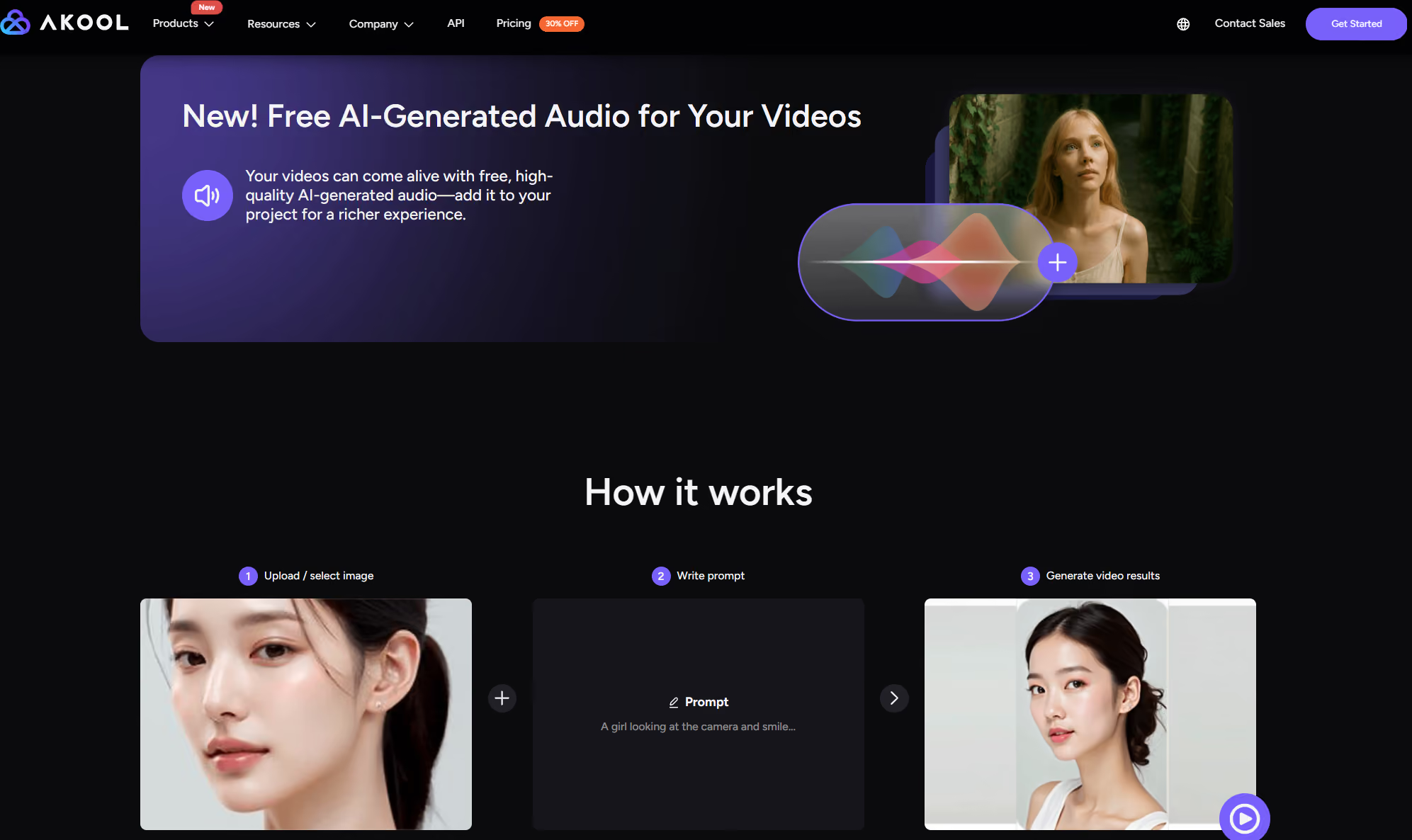
Akools deep neural network transforms any static image into a cinema-grade dynamic video, with support for complex scene extension and physics-based motion simulation. It’s redefining the standard in artificial intelligence create video by raising the bar for Image to Video quality and realism.

Key Features:

  • Physics-Based Motion Control – Precisely control how image elements move by inputting physics parameters (e.g. wind or gravity), enabling natural motions like flowing fabric or drifting smoke. This physics engine integration means, for instance, falling snow in a photo will realistically accumulate on shoulders or surfaces.
  • Temporal Consistency Engine – Maintains subject continuity to avoid flicker, keeping faces and objects steady across frames for lifelike results (a major industry pain point). Characters remain consistent and true-to-life, with expressions and identity aligned throughout the video.
  • Auto-Storyboard Generator – Automatically expands a single image into a multi-scene narrative. For example, you can upload one product photo and Akool will generate a 30-second sequence of various angles and contexts, effectively storyboarding a mini video ad in seconds.
  • 4K HDR Rendering – The only commercial tool in its class offering up to 4K, 60fps output. Even on the free tier, Akool supports professional-quality 4K video generation, delivering sharp visuals and vibrant HDR colors for truly cinematic AI videos.

Use Cases:
Akool shines in scenarios from e-commerce to education. Marketers can convert static product shots into engaging product demo videos with captions and voiceovers – no studio shoot needed. Content creators bring old portraits or historical photos to life as talking, moving characters. From corporate training (turning slides into animated explainers) to social media posts, Akool’s dynamic video generation turns any image into a compelling story. This broad versatility, combined with its physics-based realism, makes it a go-to choice to create AI videos that look film-grade.

3. Tripo AI — Image-to-3D Model Generator

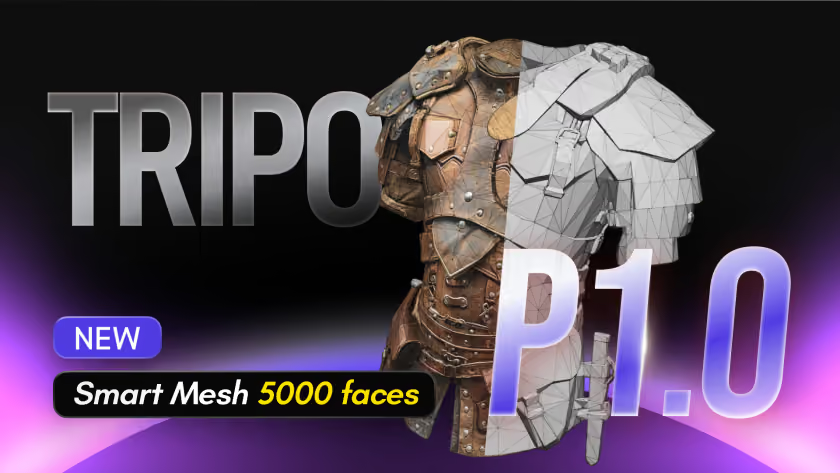
Tripo AI adds a 3D creation layer to the image-to-video conversation. Instead of only animating a photo into a flat clip, Tripo turns images or text prompts into high-quality 3D models that can be used in games, animation, AR/VR experiences, product visualization, prototyping, and 3D printing. For creators building AI videos, Tripo is especially useful when a campaign needs reusable 3D assets before those assets are rendered, animated, or placed into a broader video workflow.
Key Features:

  • Clean Topology & Production-Ready 3D Assets Tripo AI generates optimized mesh topology that makes AI-generated 3D models easier to edit, rig, animate, and reuse in professional workflows. The platform also reduces manual cleanup, helping designers, developers, and 3D artists move faster from concept to production-ready 3D assets for games, animation, and product visualization.
  • Low-Poly Efficiency for Real-Time Rendering – Tripo AI supports lightweight low-poly 3D asset generation optimized for real-time rendering, gaming, AR/VR, and interactive experiences. Smaller and more efficient 3D models improve rendering speed and performance across engines like Unity, Unreal Engine, Godot, and Cocos.
  • Flexible 3D Pipeline Compatibility – Tripo-generated assets integrate smoothly with popular 3D software and game engines including Blender, Maya, Unity, Unreal Engine, Godot, and Cocos. This flexibility allows creators to use AI-generated 3D models across animation, cinematic rendering, virtual production, product visualization, and interactive media workflows.
  • HD 3.1 for High-Detail AI 3D Generation – Tripo AI’s HD 3.1 model focuses on richer geometry, improved visual fidelity, and more detailed AI-generated 3D models. This makes it ideal for cinematic shots, character design, collectibles, props, and product concepts where higher-quality 3D visuals are important.

Use Cases:
Tripo AI is ideal for creators who want to transform flat visuals or rough ideas into usable 3D assets. Game developers can quickly generate lighter low-poly props, characters, or environment assets for real-time rendering. Product and marketing teams can use HD 3.1 to explore detailed product concepts, collectibles, and close-up cinematic visuals. Designers can bring generated models into Blender, Maya, Unity, Unreal Engine, Godot, Cocos, and other 3D pipelines for refinement, animation, staging, and rendering. For AI video creators, Tripo helps bridge image generation, 3D asset production, and downstream animation workflows.

Limitations:
Tripo AI is not a traditional image-to-video generator, so users looking for instant cinematic clips, lip-sync avatars, or music-synced animations may still need tools like Akool, Runway, Pika, or Kaiber. Its strength is 3D asset generation and pipeline-ready output, not full video editing. While clean topology and low-poly options reduce cleanup, complex characters, highly detailed close-ups, or assets intended for advanced rigging may still require artist review and manual refinement. Single-image 3D generation can also struggle when the source image lacks hidden angles, clear structure, or enough visual detail, because the system must infer unseen sides of the object.

4. Pika Labs — Community-Powered Image-to-Video Platform

Pika Labs takes a community-driven approach to artificial intelligence create video. It transforms text or images into high-quality, dynamic short videos with an array of creative effects (with playful names like “Poke It” and “Tear It”). This image to video tool has a strong Discord community that shares templates, ideas, and challenges, making AI video generation feel like a collaborative, evolving playground of visual styles.

Key Features:

  • One-Click Special Effects (Pikaffects) – Pika Labs offers a library of quirky, community-created effects that can be applied to your images with a single click. These Pikaffects allow you to manipulate objects in a photo in imaginative ways – for example, Inflate (to balloon objects), Melt, Explode, “Poke It,” “Tear It,” and more. With no complex prompting, you can instantly add these animated effects to an image, making it ripple, burst, or morph in ways that captivate viewers.
  • Multi-Modal Input – Flexibility is a core strength: you can generate videos from either a text prompt or an image (or both). Pika Labs will interpret your input to create a short animated video, whether you describe a scene or upload a photo. This means you can start with a blank idea (“a flying car in a sunset sky”) or take an existing picture and bring it to life with motion. The tool excels at create AI videos in various styles – cinematic, cartoonish, or artistic – depending on the prompt.
  • Keyframe Animation (Pikaframes) – The latest Pika Labs updates introduced Pikaframes, 사용자가 단일 비디오 내에서 여러 장면이나 카메라 앵글을 연결할 수 있도록 합니다. 기본적으로 이미지 프롬프트나 키 프레임 시퀀스를 설정하면 Pika가 그 사이를 부드럽게 전환해 줍니다. 이는 기본적인 스토리보드 기능을 제공합니다. 예를 들어, 인물 사진으로 시작하여 광각 장면으로 전환하면 Pika가 전환을 애니메이션화하여 최대 약 10초 길이의 일관된 짧은 스토리를 만들어냅니다.
  • 활발한 커뮤니티 및 템플릿 – Pika Labs는 커뮤니티 중심적입니다. 사용자들은 Discord에서 자신들의 창작물과 프리셋을 공유하며, Pika는 인기 있는 사용자 실험에서 영감을 받은 새로운 템플릿을 자주 선보입니다. 새로운 시각 효과나 테마(#inflation effect 또는 #anime style 등)가 소개되고 이를 시도하는 사용자에게 무료 크레딧이 제공되는 커뮤니티 주도 "챌린지"도 있습니다. 이는 플랫폼의 기능이 크라우드소싱된 창의성으로 항상 확장되고 있으며, 초보자도 처음부터 시작하지 않고 커뮤니티의 템플릿을 복사하여 복잡한 결과를 얻을 수 있음을 의미합니다.

활용 사례:
Pika Labs는 빠르고 재미있는 콘텐츠 제작에 이상적입니다. 소셜 미디어 마케터들은 이를 활용하여 매력적인 마이크로 비디오를 제작합니다. 예를 들어, 제품 이미지를 폭발하는 텍스트와 화려한 효과가 있는 5초짜리 애니메이션 광고로 바꿀 수 있습니다. 교육자와 스토리텔러는 삽화나 다이어그램을 빠르게 애니메이션화하여 학생들을 위한 콘텐츠를 더욱 생동감 있게 만들 수 있습니다. 사용 편의성과 기발한 효과 덕분에 밈, 마케팅 틱톡 또는 정적인 이미지를 공유 가능한 동적 비디오 생성으로 만들고 싶은 모든 시나리오에 완벽합니다. 짧은 애니메이션 이야기를 만드는 스토리텔러부터 홍보 이미지를 멋지게 꾸미는 소규모 기업에 이르기까지, Pika의 커뮤니티 기반 툴킷은 창의적인 비디오 마법에 대한 장벽을 낮춥니다.

한계점:
Pika Labs는 전통적으로 속도와 편의성을 위해 해상도를 희생했습니다. 초기 버전은 작은 출력(최저 512×512 픽셀)만 지원했으며, 최근 개선에도 불구하고 현재는 1080p HD로 제한되어 일부 경쟁사만큼의 초고해상도나 세밀한 디테일은 부족합니다. 비디오는 짧습니다(약 10초 이하). 재미있는 효과에 중점을 두기 때문에 결과물이 때로는 덜 세련되거나 현실적이지 않을 수 있습니다. Pika는 물리적 정확성(진정한 물리 시뮬레이션 없음)보다는 시선을 사로잡는 스타일에 초점을 맞춥니다. 또한, 기본 기능은 무료로 사용해 볼 수 있지만, 많이 사용하려면 더 많은 크레딧과 고품질 렌더링을 위해 구독이 필요합니다. 요컨대, Pika Labs는 빠르고 기발한 이미지-비디오 작업에는 탁월하지만, 길거나 사실적인 제작물에는 적합하지 않습니다.


5. Morph Studio — 3D 장면 이미지-비디오 재구성 도구

Morph Studio는 이미지-비디오를 3차원으로 확장합니다. 이 플랫폼은 이미지(또는 여러 이미지)를 가져와 가상 3D 장면을 재구성하여 AI 생성 비디오 내에서 카메라가 "움직일" 수 있도록 합니다. 생성형 비디오와 3D 애니메이션을 연결함으로써 Morph Studio는 새로운 지평을 엽니다. 인공지능 비디오 생성 분야에서 말이죠. 단 한 장의 사진을 깊이감, 원근감 변화, 영화 같은 복잡한 움직임이 있는 몰입형 클립으로 바꿀 수 있습니다. 정적인 이미지가 동적이고 3D와 같은 스토리로 변하는 독특한 올인원 도구입니다. 이미지-비디오 변환입니다.

주요 기능:

  • 단일 이미지 3D 애니메이션 – Morph Studio는 고급 모델을 사용하여 평면 이미지에서 깊이와 기하학적 구조를 추론하여 3D 생명력을 불어넣습니다. 기본적인 3D 모델 비디오나 심지어 이미지 하나만 업로드하면 AI가 이를 매혹적인 3D 애니메이션 최소한의 노력으로. 예를 들어, 풍경 사진 한 장만으로도 Morph는 시청자가 마치 그 장면 속을 움직이는 듯한 부드러운 카메라 플라이스루를 만들 수 있습니다. 2D 이미지에서 3D를 구현하는 이 기능 덕분에 단 한 장의 사진으로 시차 카메라 효과(전경과 배경의 움직임)와 미세한 각도 변화를 모두 생성할 수 있습니다.
  • 스토리보드 캔버스 및 장면 제어 – Morph Studio는 비디오 스토리를 계획하고 제어할 수 있는 시각적 캔버스를 제공합니다. 여러 장면이나 샷을 배치하고 하나씩 생성할 수 있어 긴 비디오를 구성하는 데 매우 유용합니다. 무엇보다 중요한 것은, 이를 통해 각 샷에 대한 완벽한 제어 – 스토리보드의 모든 장면에 대해 카메라 방향, 움직임, 샷 지속 시간을 조정할 수 있습니다. 이미지 전체를 가로지르는 5초 클로즈업 팬에 이어 3초 와이드 풀백을 원하시나요? 해당 매개변수를 설정하기만 하면 Morph의 AI가 이를 실행합니다. 이러한 정교한 제어는 일반적으로 전문 애니메이션 소프트웨어에서만 볼 수 있었지만, 이제 AI 도구에서 사용할 수 있게 되었습니다.
  • 통합 다중 모델 스위트 – Morph Studio는 한 가지 기능에만 국한되지 않습니다. 하나의 인터페이스에 다양한 생성형 AI 모델을 통합합니다. 동일한 플랫폼에서 텍스트-이미지 및 텍스트-비디오 생성, 이미지-비디오 애니메이션, 심지어 비디오 스타일 전송 기능까지 제공합니다. 예를 들어, Morph Studio 내에서 하나의 AI 모델로 이미지를 생성한 다음 다른 모델로 애니메이션을 적용할 수 있습니다. 그 이점은 원활한 워크플로우입니다. 한 곳에서 아이디어를 구상하고 실행할 수 있습니다. 한 시각 예술가가 언급했듯이, 이 모든 AI 도구의 통합은 "창작자들에게 몰입 상태를 만들어주고" 복잡한 패턴 전반에 걸쳐 좋은 일관성을 제공합니다. 본질적으로 Morph Studio는 AI를 위한 올인원 창작 스튜디오이므로, 비전을 달성하기 위해 여러 앱을 오갈 필요가 없습니다.
  • 비디오 스타일 전송 및 효과 – 또 다른 멋진 기능: 비디오에 다양한 시각적 스타일을 적용할 수 있습니다. Morph Studio의 비디오 스타일 전송 기능은 기존 비디오(또는 AI 생성 비디오)를 애니메이션, 클레이메이션, 연필 스케치 등과 같은 스타일로 다시 렌더링할 수 있습니다. 이는 이미지를 애니메이션화한 후, 클릭 한 번으로 결과 비디오를 유화나 픽사 스타일의 만화처럼 보이게 만들 수 있다는 의미입니다. 또한 속도 변경이나 모션 블러 추가와 같은 일반적인 비디오 편집도 지원합니다. 3D 애니메이션과 스타일 전송의 조합은 창작자들이 진정으로 독특한 결과물, 예를 들어 손으로 그린 듯한 3D 애니메이션 장면을 생성할 수 있게 합니다. 이 모든 기능은 전문 기술 없이도 접근 가능하며, 이는 Morph의 사명을 강조합니다. 3D 애니메이션을 대중화하는 것.

활용 사례:
Morph Studio는 복잡한 소프트웨어 없이 3D로 장면을 시각화하려는 영화 제작자, 게임 디자이너 및 모든 창작자에게 큰 도움이 됩니다. 독립 영화 제작자는 스토리보드의 빠른 3D 애니메이션을 생성하여 장면을 사전 시각화할 수 있습니다. 즉, 컨셉 아트를 통해 카메라를 움직여 샷을 계획할 수 있습니다. 제품 디자이너는 제품의 단일 이미지를 사용하여 회전하는 3D 홍보 비디오를 만들 수 있으며, 심지어 촬영되지 않은 각도에서도 제품을 보여줄 수 있습니다. 교육자들은 Morph를 사용하여 역사적 이미지나 과학 다이어그램에 애니메이션을 적용하여 평면적인 자료에 깊이와 움직임을 더했습니다. 일반 사용자도 즐길 수 있습니다. 예를 들어, 파노라마 사진으로 짧은 "3D" 여행 비디오를 생성할 수 있습니다. Morph의 다재다능함은 다음과 같은 활용 사례를 아우릅니다. "생성형 비디오 모델로 오늘날 영화 제작자가 되세요" 일상적인 시각적 스토리텔링에 이르기까지. 아마추어와 전문가 모두에게 적합합니다. 사진 한 장으로 3D 감각이 더해진 애니메이션 다중 장면 비디오를 쉽게 만들고 싶은 사람이라면 누구나 Morph Studio의 대상이 됩니다.

한계:
Morph Studio의 3D 착시 효과는 인상적이지만, 한계가 있습니다. 진정으로 정확한 3D 재구성은 일반적으로 여러 이미지나 뷰를 통해 이점을 얻습니다. 단일 2D 사진은 한계가 있습니다. 단 한 장의 이미지만 입력하면, 극도로 큰 카메라 움직임이나 극적인 각도 변화는 왜곡이나 비현실적인 결과(AI가 객체 뒤에 있는 것을 "환각"해야 함)를 초래할 수 있습니다. 실제로 Morph는 단순한 장면에서 가장 잘 작동하거나, 깊이 효과를 강화하기 위해 추가 참조 이미지를 사용할 때 가장 좋습니다. 또한, 복잡한 3D 유사 비디오를 렌더링하는 것은 리소스 집약적일 수 있습니다. 고해상도, 다중 장면 비디오를 집중적인 스타일 전송과 함께 생성하는 것은 더 간단한 2D 애니메이션에 비해 처리 시간이 더 오래 걸릴 수 있습니다. 마지막으로, 진화하는 플랫폼으로서 일부 틈새 기능(예: 매우 상세한 인간 애니메이션 또는 장시간 일관성)은 아직 성숙 단계에 있습니다. 사용자는 완벽한 결과물을 얻기 위해 프롬프트와 모델을 실험해야 할 수도 있습니다. 그럼에도 불구하고 Morph Studio는 획기적인 도구로 남아 있습니다. 단일 이미지 3D 기능의 한계를 뛰어넘을 때 신중한 입력에 보답하는 도구입니다.

결론

부터 물리 기반 모션 사실적인 음악 동기화 애니메이션에 이르기까지, 이러한 AI 도구들은 사진을 살아있는 영상으로 바꾸는 방식을 혁신하고 있습니다. 각 플랫폼마다 고유한 강점이 있지만, Akool의 물리 엔진은 단연 돋보이며, 이미지를 “살아있는 이야기”영화 같은 품질. 이는 비할 데 없는 사실감과 창의성의 조화를 제공합니다. — 몇 번의 클릭만으로 할리우드급 애니메이션을 구현하는 것이죠. 콘텐츠 제작의 미래를 경험할 준비가 되셨다면, Akool의 강력한 이미지-투-비디오 도구를 사용해 보세요. Akool 무료 체험을 이용해 보세요 상상력을 초월하는 AI 영상을 만들어 보세요.

자주 묻는 질문
Q: Akool의 사용자 지정 아바타 도구가 HeyGen의 아바타 생성 기능이 제공하는 사실감과 사용자 지정에 필적할 수 있습니까?
A: 예, Akool의 맞춤형 아바타 도구는 사실감과 사용자 지정 측면에서 HeyGen의 아바타 생성 기능과 일치하며 심지어 능가합니다.

Q: Akool은 어떤 비디오 편집 도구와 통합됩니까?
A: Akool은 어도비 프리미어 프로, 파이널 컷 프로 등과 같은 인기 있는 비디오 편집 도구와 원활하게 통합됩니다.

Q: Akool의 도구가 HeyGen의 도구에 비해 뛰어난 특정 산업 또는 사용 사례가 있습니까?
A: Akool은 마케팅, 광고 및 콘텐츠 제작과 같은 산업에서 탁월하며 이러한 사용 사례에 특화된 도구를 제공합니다.

Q: Akool의 가격 구조가 HeyGen의 가격 구조와 다른 점은 무엇이며 숨겨진 비용이나 제한 사항이 있습니까?
A: Akool의 가격 구조는 투명하며 숨겨진 비용이나 제한이 없습니다.HeyGen과 구별되는, 고객의 요구에 맞춘 경쟁력 있는 가격을 제공합니다.

Lexus Jenkins
Akool Content Specialist
Molestias et suscipit qui aliquid repudiandae velit dolores qui. Non aut ducimus suscipit repellendus et dignissimos enim. Qui
자세히 알아보기
참고 문헌

Lexus Jenkins
Akool Content Specialist